What’s new for 2011

A number of upgrades and modifications have been made to ScotBlogs to better prepare our bloggers for 2011. We’ve made theme enhancements to support new features in WordPress 3, added mobile support for readers/editors and the ability to generate thumbnails for use in a post.

Theme Enhancements

A new theme was created to support new features introduced with wordpress 3. “Wooster 2011” is based on the same ScotBlogs design, but has added support for custom menus and headers. These features are available under “Appearance” after activating “Wooster 2011” on your blog. Custom menus can be used as your primary navigation or as a widget in your sidebar. There are currently 5 custom header images to choose from, more will be added in the future. At this time we are asking that you do not upload your own images as headers as they will be reverted. Please contact Dwight if you need assistance or have an image you would like to submit for use.

Mobile Support

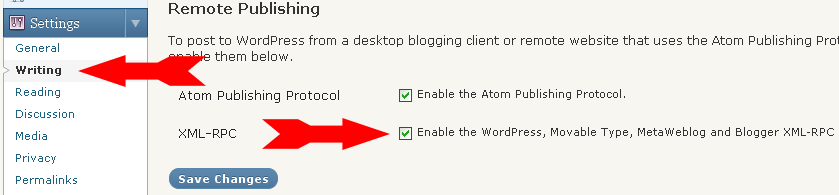
Remote Publishing Section

Enabling Support for WordPress Mobile Apps

ScotBlogs now supports mobile posting from Android, BlackBerry and iOS devices. This feature is disabled by default, but the administrator of a blog can enable it by enabling XML-RPC in the Remote Publishing section of Writing Settings (Settings>Writing in the left navigation).

In addition to mobile posting, we’ve also added mobile theme support. When a user navigates to ScotBlogs on their mobile device, they are presented with a different look. The same information is shown, but displayed in an interface that is more suitable for a mobile device. The reader has the option to view the site normally by selecting “Exit The Mobile Edition” at the bottom of the page.

Post Thumbnails

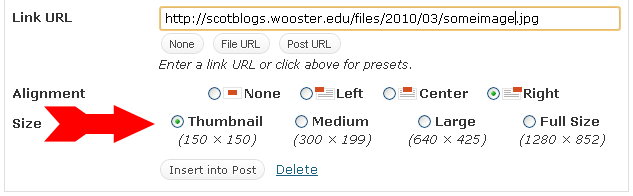
Until now, editors who wanted to preserve the detail of a full-size image had the choice to insert the image on a new line or behind a link.  It is now possible to insert a small image (thumbnail) into a post that links to the full size image when clicked. This allows editors a convenient way to preserve the original image when inserting next to related content. This can be done simply by choosing a size when inserting an image into a post.

Posted in Updates | Tagged , , | 1 Comment

WordPress 2.9.2 and plugins

We’ve upgraded ScotBlogs to WordPress 2.9.2! Along with some of the other new features available, one that we are most excited about is the ‘Trash’ feature, which now shows its status for posts, pages, and comments (and includes restore and permanent delete).

In previous versions, WordPress would open the ‘View your new post’ page in the same window as the administrative panel, which would force users to either ‘back up’ through the browser or login again through the wp-admin page. Now, View/Preview post opens in a new window from the link in the Saved/Updated message.

For users who have used the plugin “WP Sticky Post” – the sticky feature is now embedded in WordPress without using the plugin, which is why it has been removed from our Plugin offerings. In the publish box to the right of your content window, click the “Edit” button next to “Visibility” and you will see the checkbox for “Stick this post to the front page”. Just check it off and hit “Publish” when you are done writing your post, and it will stay at the top of your page regardless of how many posts you create after it.

Another plugin we have had in our roster for a while has been Admin Management Xtended, and just to show you all of its features, here is a quick video about it:

Admin Management Xtended Demo from Oliver Schlöbe on Vimeo.

Posted in Updates | Tagged , | Leave a comment

Advanced Grammar/Spelling Checker Now Available

Every day, our ScotBlogs users publish over 100 posts, yet many do not use the spell checker. It may be that at this wonderful institution, our users are all wonderful spellers. Or it may be that they just forget to use it.

We have just installed After the Deadline, an intuitive spelling and grammar checker, to all of our blogs. An API key is required for its use, and you may enter the College’s key to use the software: 9546992ac1e662c817b695ff126ff400

And, you can view a comprehensive demo in the video below (originally created for WordPress.com):

Posted in Updates | Tagged | Leave a comment

Take a bite out of spam on your ScotBlog!

We have gotten many requests for a spam-blocking system on ScotBlogs and would like our users to get familiar with Akismet, a spam-blocking plugin that is now activated site-wide on all of the blogs on the server. I’ll begin with a few snippets from Akismet’s own FAQ site:

How does it work?

When a new comment, trackback, or pingback comes to your site it is submitted to the Akismet web service which runs hundreds of tests on the comment and returns a thumbs up or thumbs down.

Do I have to maintain a blacklist?

Nope! Part of the idea of Akismet is that you’re always protected up-to-the-second from the latest dirty tricks of spammers. There’s no maintenance, no upgrading, no hassle.

Where does the spam go?

When the plugin catches something as spam it saves it in the database for 15 days in case you want to check it out manually and then automatically deletes it. In the unlikely event something gets incorrectly identified as spam you can correct it and it submits the “false positive” back to Akismet for analysis and improvement of our system. If a spam comment happens to get through and you mark it as spam within WordPress, it does the same thing. Akismet becomes more effective the more you use it.

Help! Akismet is catching a regular comment as spam!

Don’t worry, if you see a regular comment on your Akismet page, just click the “Approve” button or the “Not Spam” checkbox and submit and the comment will be sent back to Akismet as a mistake. The system will learn from your submission, though it may take a day or so in some cases. False positives, as they’re called, are extremely rare and we watch them closely.

How do I get rid of the “Missing API Key” message on my ScotBlog Dashboard?

You can enter the Wooster.edu API key by navigating to Plugins -> Akismet Configuration from your Dashboard, and entering the following key into the appropriate field: 42ce38ac029f .

If you have any problems with your Akismet setup, please contact The Office of Web Communication.

Posted in Tutorials, Updates | Leave a comment

Not sure if you should use ScotBlogs?

If you’re not sure whether hosting your blog on ScotBlogs is the best thing for you, check out our new page, “When to Use ScotBlogs“.

Also, if you’re wondering if you need a Blog or a Wiki, look no further than our comprehensive Wiki vs. Blog page!

Posted in Tutorials, Updates | Leave a comment

Introducing Gravatar

The screencast below gives an overview of Gravatar, which provides a quick and easy way to get a globally recognized avatar that will work with ScotBlogs and beyond.

Posted in Tutorials, Updates | Tagged | Leave a comment

Quick Overview of WordPress Now Available

There is now a quick overview of WordPress MU available for new ScotBlogs users. You can find this on the page “Beginners Guide to ScotBlogs“.

Posted in Tutorials, Updates | Tagged | Leave a comment

ScotBlogs Launched!

Our blogging server is up and running with a new version of WordPressMU and new features for our Official Blogs! Get ready for a complete listing of blogs available through our new blogging site.

Posted in Updates | Comments Off on ScotBlogs Launched!